PoP3 Email for Small Businesses: A Simple “What You Get” Guide (Without the Jargon)
Email guide
PoP3 Email for Small Businesses: A Simple “What You Get” Guide (Without the Jargon)
PoP3 is easier to understand once you stop treating it like a mysterious protocol and start treating it like a practical service promise: your mail gets collected, your public address can stay steady, and your daily inbox should remain manageable.
Most readers arrive here with three sensible questions. What does a PoP3 service actually do? What stays the same if the real inbox changes behind the scenes? And what should you expect before you fill in an email application form? Those are the right questions. Email is rarely interesting until it stops working.
This guide keeps the answer practical. It explains what PoP3 means in everyday terms, what a small business usually gets from this kind of service, where the limits are, and what to check before you commit to it. If you want the formal standard later, RFC 1939 is the technical definition, but you do not need to read a protocol document to decide whether the service fits your workflow.
Quick answer: what “PoP3” means in everyday terms
PoP3 is a way to collect email from a server and bring it into your inbox program. Think of it as a retrieval service. New messages arrive at the server first, then your email app checks in, collects them, and presents them inside the inbox you use every day.
For a small business owner, the useful part is not the acronym. The useful part is the experience. You get one main inbox program to work from, a server that holds incoming mail until your app checks it, and a simple routine that can suit a business that values stability over bells and whistles.
The reasonable default way to think about PoP3 is this: it helps move mail from “out there on the server” to “here in the inbox I actually open.” That is less glamorous than a software launch, but it is exactly the sort of dependable plumbing many small operations want.
What you typically get: one inbox experience, server access, and predictable delivery behavior
A PoP3 email service is usually sold with practical promises rather than technical poetry. In plain language, you are typically getting a mailbox that receives messages, a way for your email app to collect them, and an arrangement that keeps the public-facing address usable while you manage the real destination behind the scenes.
| What you get | What it means day to day | What to watch for |
|---|---|---|
| One main inbox experience | You open the mail app you already use and work from a familiar inbox view. | Decide which device or computer you want to treat as the primary home for that inbox. |
| Server-side receiving | Mail reaches the server first, then your app checks for it and collects it. | Delivery can feel “batch-like” if your app checks at intervals rather than every second. |
| A stable public address | Customers keep using the same published address even if the destination inbox changes later. | That stability depends on the forwarding or redirection details being current and correct. |
| Basic filtering and scanning | Some suspicious or harmful messages may be filtered before they ever reach your screen. | Treat scanning as a helpful layer, not as a permission slip to trust every message. |
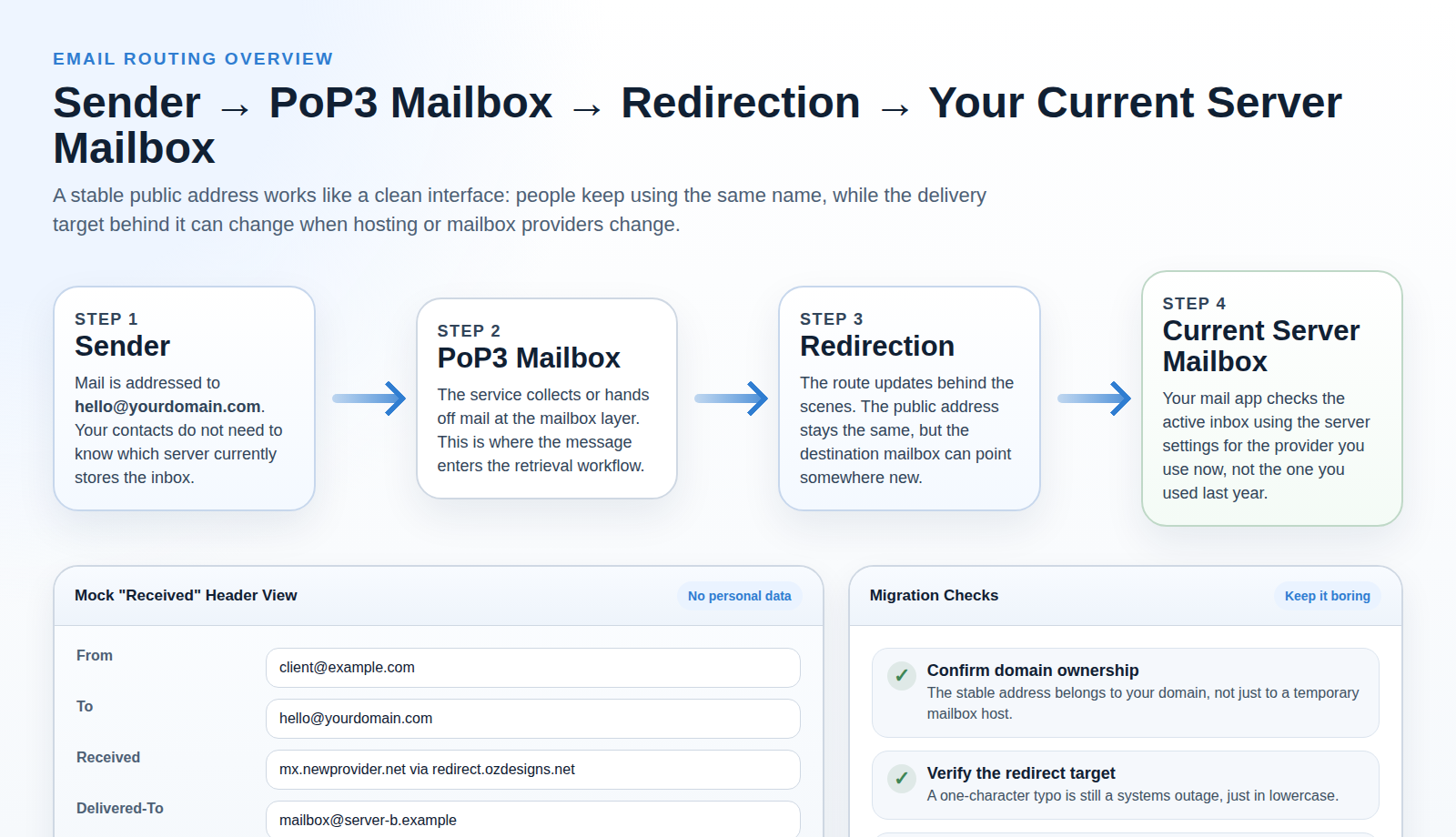
The experience is often calmer than the name suggests. Someone sends mail to your public address, the server receives it, and your inbox client collects it. The part that matters to a business is whether the address stays usable and whether the routine matches how you actually work.
Address stability: what “redirect to your new server” means for day-to-day use
This is usually the most valuable promise in plain business terms. Address stability means the email address people know does not have to change every time your underlying provider does. That reduces cleanup work on your website, printed materials, directories, and past customer records.
Imagine you have published [email protected] on your site, invoices, and business cards. Later, you change internet provider, hosting, or the mailbox that actually receives those messages. Without a forwarding layer, you might need to tell everyone about a new address. With a redirection setup, the public address can remain the same while the hidden destination changes.
In daily use, this means people keep writing to the address they already know. Behind the scenes, the service sends those messages on to the inbox you currently use. It is less dramatic than a full migration and far less annoying than updating contact details everywhere you have ever typed them.
Virus scanning claim: how to think about it responsibly
Virus scanning is useful, but it helps to treat it with disciplined expectations. A scanning layer can reduce obvious threats. It cannot make email risk-free. Some harmful attachments will be blocked. Some suspicious links will still rely on you noticing that something looks wrong.
That is why good email safety is a stack, not a single checkbox. Filtering helps. Sensible passwords help. Careful message handling helps. Microsoft’s overview on protecting yourself from phishing and the NCSC guide for small organisations both make the same broader point: automated protection matters, but user judgment still carries part of the workload.
So the fair reading is this. If a PoP3 service says mail is scanned, take that as a meaningful safeguard. Do not take it as a guarantee that every dangerous message will vanish before breakfast. Email security, much like office coffee, improves morale but does not replace judgment.
The one requirement that matters most: entering the correct email address
Many service problems begin with something painfully ordinary: the wrong address was entered at the start. If the destination address is incomplete, misspelled, or outdated, the forwarding logic has nowhere useful to send the message.
That is why the “correct email address” warning deserves more respect than it usually gets. A PoP3 service can only route mail to the address you provide. If one character is wrong, the service may appear broken even though the real issue is the destination details.
- Copy the destination address from a verified source instead of retyping it from memory.
- Check the domain portion carefully, especially if you use more than one business address.
- Send yourself a test message after any change, then confirm where it arrives.
- Keep one written record of the current destination inbox so future updates use the same reference.
This is also where choosing an inbox client matters. Most desktop mail apps ask for the same core account details, and the Apple Mail account guide is a decent example of the general shape of that process even if you use a different app.
Common questions
Will my address change?
Not necessarily. If your public-facing address is treated as the stable contact point and the service redirects mail to your current inbox, the address other people use can stay the same.
What happens if I switch providers?
In the best-case version, you update the hidden destination inbox rather than republishing a new address everywhere. The public address stays put; the route behind it changes.
Do I still use my usual inbox?
Usually, yes. That is part of the appeal. Your everyday experience stays centered on the inbox program you already open. The PoP3 service works in the background to receive and route mail so that your client can collect it.
Will messages arrive instantly?
Often they arrive quickly, but the exact timing depends on how often your email app checks for new mail. This is not usually a problem for normal business correspondence, but it helps to know that “not this exact second” is not the same thing as “not working.”
Does this solve every email problem?
No. It solves a specific class of problem: keeping email retrieval simple and keeping a public address stable when the real inbox changes. It does not replace broader security habits, mailbox organisation, or support when a provider-level issue appears.
Who this is best for, and who might prefer something else
PoP3 is often a strong fit for a small business that wants one dependable contact address and one main place to check mail. It suits owners who prefer a straightforward routine and do not need every device to mirror every inbox action all day.
Best fit
One main inbox, one published address, and a business that values continuity more than fancy mailbox syncing.
Possible friction
Several devices, several people, or a strong need for the exact same mailbox state everywhere.
Reasonable default
Use PoP3 when simplicity is the goal. Look at a more heavily synced setup when shared access matters more than local retrieval.
The decision criteria are fairly simple. If you mainly want a stable address and a clear inbox routine, PoP3 can be a good fit. If your business depends on seeing the same mailbox state across devices or people, you may prefer a different kind of email setup.
Next steps: what to do before you submit an email application form
- Confirm the exact destination address. Check spelling, domain, and whether it is still the inbox you want to use.
- Decide which inbox client will be your main home base. One reliable default is better than a half-dozen improvised checks.
- Review the broader service details. The services page and application form explain the surrounding support path.
- Send a test message after setup. Confirm where it lands and how quickly it appears.
- Keep the contact path handy. If something looks off, use the contact page while the details are still fresh.
If you want more context first, browse the latest articles on the blog or return to the homepage for the main overview. The best fit here is not the most technical option. It is the one that keeps your business reachable with the fewest avoidable surprises.