PoP3 Email Redirection: How Your Address Stays the Same When You Switch Servers
Email continuity guide
PoP3 Email Redirection: How Your Address Stays the Same When You Switch Servers
Server moves should change plumbing, not force you to repaint your public email address across your website, forms, invoices, and that dusty box of business cards nobody wants to reprint.
Readers usually arrive with the same cluster of questions. Does PoP3 redirection really let me keep the same address? What actually changes when I switch hosting or mailbox providers? Will contacts need an update? And what do I need to verify before I trust the new setup with real messages?
The underlying problem is real because email has layers. The POP3 specification describes how a client retrieves messages, while an MX record determines where a domain accepts mail in the first place. When those layers get blurred together, a routine provider change starts to feel like a total identity crisis.
This guide breaks the system into plain English: what redirection means, how mail flows when PoP3 is in the picture, what stays stable, what still changes, what to check before subscribing, and how to avoid treating email routing like a mystery cult with passwords.
Quick definition: what “redirection” means in everyday language
Redirection means your public email address stays the same while the inbox behind it changes. Think of it as updating the delivery route without changing the street name. People still send mail to [email protected], but the message can land in a different real mailbox after you switch providers.
That matters because your public address is part of your interface. It appears on your homepage, your contact page, your invoices, maybe a few directories, and possibly a sign-off you wrote years ago when optimism was high and documentation was low. The more places an address appears, the more valuable stability becomes.
PoP3 is only one part of the stack. It tells an email client how to retrieve messages from a mailbox. Redirection sits earlier in the chain and decides where those messages should be delivered. If you confuse those jobs, every hosting move feels much more dramatic than it is.
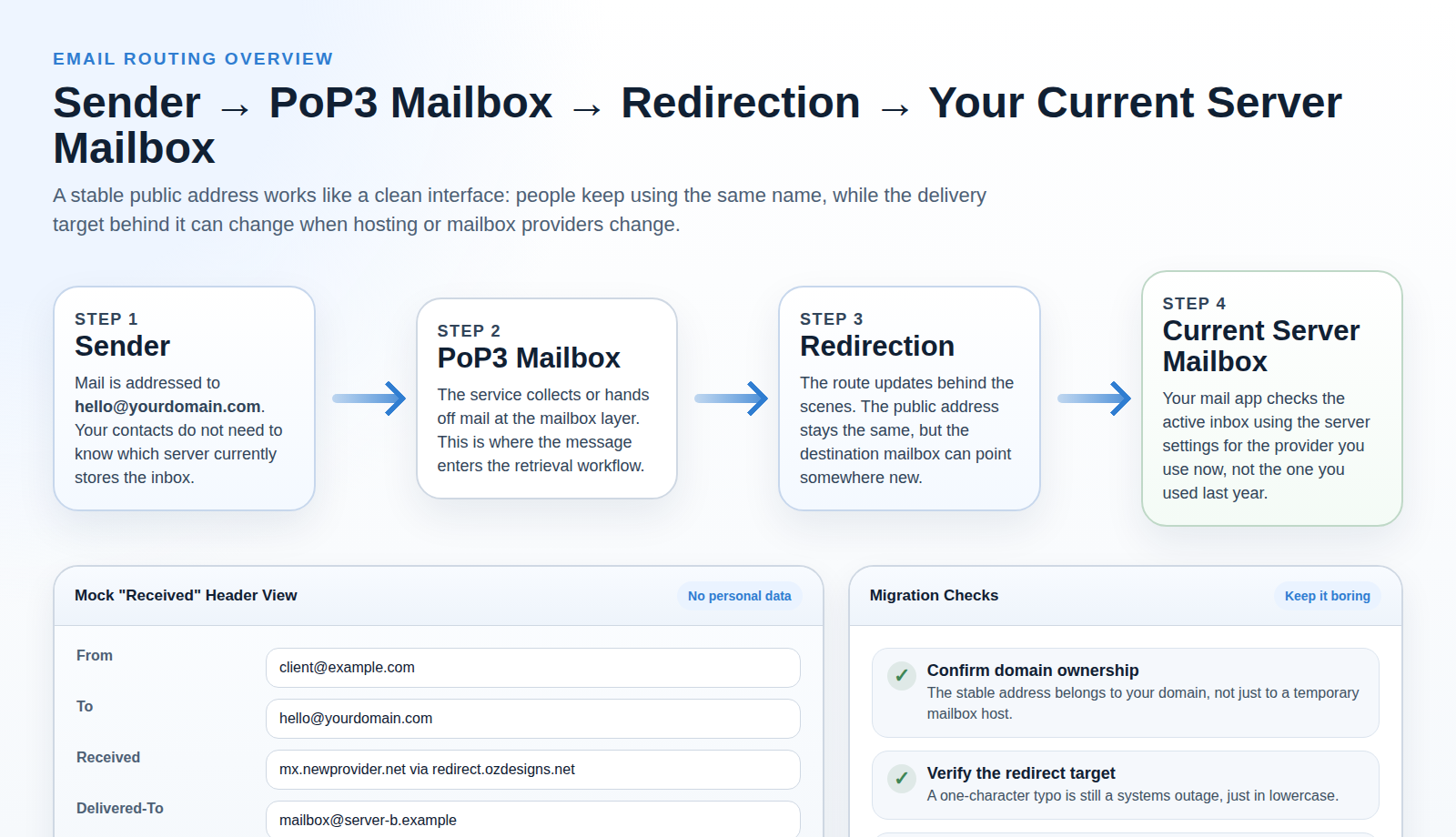
The typical flow of email with PoP3 redirection
Here is the clean version of the workflow:
- A sender writes to your public address. They use
[email protected]because that is the address they know. - Mail reaches the mail-routing layer for your domain. That layer decides where mail for that address should go.
- Redirection points the message to the current destination mailbox. If you changed providers, this is the part you update.
- Your active mailbox stores the message. That mailbox may live on a different host than the one you used before.
- Your email client retrieves the message with PoP3. The client needs the correct incoming server, username, password, and port for the mailbox that is active now.
The simple rule: the public address is the name people use, the destination mailbox is where mail actually lands, and PoP3 is how your app retrieves it. Three layers, three jobs.
If you want a plain reference on how retrieval differs from ongoing server synchronization, Mozilla’s POP3 versus IMAP guide is a useful companion read. It helps separate mailbox behavior from routing behavior, which is where most confusion starts.
Terminology that makes the whole topic less slippery
Email problems often look mysterious when the language is fuzzy. Once the terms are separated, the system becomes far easier to reason about.
| Term | What it means here | Why it matters |
|---|---|---|
| Public address | The email address people type and remember, such as [email protected]. |
This is the part you usually want to keep stable. |
| Mailbox | The actual inbox that stores the message. | This can move when you change providers. |
| Redirection / forwarding | A rule that sends mail for one address to another destination mailbox. | This is what lets the visible address stay put while the target changes. |
| PoP3 client settings | The incoming server details your email app uses to collect mail. | These often change after a migration even when the public address does not. |
| DNS / MX routing | The domain-level rules that tell the internet where mail for your domain should go. | If this layer is wrong, the rest of the setup becomes a very organized disappointment. |
At a glance
What stays stable vs. what can change
| Part of the setup | Usually stays the same | May need updating |
|---|---|---|
| Public email address | Yes, if it is tied to your own domain and the route is maintained. | Only if you abandon the domain or stop routing mail for that address. |
| Inbox location | No. | It can move from one hosting company or mailbox service to another. |
| PoP3 server settings | Sometimes. | The incoming host name, port, username format, or password may change after migration. |
| Contacts and printed material | Usually yes. | You only need updates if the public address itself changes. |
That contrast is the whole value of redirection. It protects the visible address while keeping the delivery target replaceable.
Common scenarios where redirection becomes useful
Redirection is most useful when the address matters more than the current host. That includes a few very normal situations:
1. You move to a new web host
Maybe the website is moving, maybe support has become unreliable, maybe the old hosting panel looks like it was designed during a caffeine shortage in 2004. If your public address stays attached to your domain, you can update the delivery target while keeping the same address on your site and printed material.
2. You switch email providers
You may want a mailbox with better storage, better controls, or simply fewer surprises. The address your customers use does not necessarily need to change just because the mailbox behind it does.
3. You change domain management or registrar services
The registrar is not the mailbox. But changes around DNS and domain management often expose fragile email assumptions. This is where understanding DNS basics pays off. If the domain still routes mail correctly, the visible address can remain stable.
4. You want a cleaner split between “public identity” and “current inbox”
This is the builderly reason. A domain-based address becomes your stable interface. The current mailbox becomes an implementation detail. That is a healthier architecture than letting a temporary hosting package define the address that customers learn.
What to ask a provider before you trust the switch
A lot of migration pain comes from buying a service first and discovering the important constraints later. Before you subscribe, ask direct questions and listen for precise answers rather than marketing confetti.
- Can this address stay attached to my own domain? If the answer depends on using a provider-owned address, stability is weaker from day one.
- How is redirection configured? Ask whether the provider uses forwarding, aliases, mailbox mapping, or another term for the same behavior.
- Which PoP3 settings will I need after the move? Request the server name, port, authentication method, and username format in writing.
- Can I test with a temporary mailbox before changing live contact points? Good systems support staged verification.
- What happens if the destination mailbox is unavailable? You want to understand bounce behavior before a real message disappears into a support ticket.
- How are spam filtering and malware checks handled? Useful security layers are welcome, but they should be described as layers, not as mystical guarantees.
These questions are not glamorous. That is exactly why they work. Infrastructure decisions improve when the buyer is slightly boring and annoyingly specific.
Verification checklist before you subscribe or switch
Redirection helps continuity, but it is not self-healing. The route only works if the details are correct. Before you commit to a new service, verify the following:
- Confirm domain ownership. If you do not control the domain, you do not control the long-term address. Stability starts there.
- Check the exact email address that will stay public. Decide whether it is
hello@,contact@, or another address and keep it consistent. - Verify the redirect target mailbox exists now. Test the destination inbox before you stack redirection on top of it.
- Review forwarding behavior in writing. Does the service redirect to one mailbox, multiple mailboxes, or an alias layer? Different providers describe the same idea with different labels.
- Ask what client settings may change. If you use PoP3 in Outlook, Apple Mail, Thunderbird, or a similar client, incoming server details may still need updating.
- Check timing and propagation expectations. A change can take time to settle. “It is not instant” is annoying, but it is still better than “nobody mentioned that.”
- Send tests from an outside account. Use an unrelated sender and confirm delivery to the new mailbox, not just the existence of the setting in a control panel.
- Review every public contact point. Make sure your homepage, contact page, blog, and the Email Application Form all reflect the stable address you intend to keep.
If those checks pass, you are operating with evidence. That is already an improvement over the classic email migration strategy, which is often a blend of memory, screenshots, and low-grade panic.
What a clean migration sequence looks like
The safest migrations separate changes so you can tell what broke, if anything. A tidy sequence looks like this:
- Prepare the new mailbox first. Confirm that it receives mail directly before you redirect anything to it.
- Document the current state. Save the old incoming server, username format, and any forwarding rules. Future-you deserves at least one favor.
- Update the redirect target. Change one routing layer at a time instead of moving DNS, mailbox settings, and local client settings in one dramatic leap.
- Test from outside. Send from an unrelated account and confirm the message appears in the new mailbox.
- Update each mail client. Desktop apps, laptops, and older devices may still be checking the old server.
- Review website contact points. Check the address shown on the homepage, forms, and support pages so the public interface remains consistent.
This order matters because it narrows the blame when something fails. If the redirect is correct but the client still cannot retrieve mail, that is a different problem from a broken route. Email becomes manageable when each layer is allowed to fail separately instead of as one giant gray blur.
Security basics: what redirection helps and what it does not replace
Redirection is a delivery mechanism, not a universal security shield. If a service scans mail in transit, that can be useful. Filters and malware checks may reduce exposure to obvious junk or bad attachments before they reach the destination inbox.
What redirection does not replace:
- Correct mailbox credentials. A stable address does not rescue a broken login.
- Healthy routing. Wrong DNS or forwarding targets still break delivery.
- Careful message handling. Users can still click foolish things. Email remains committed to realism on that point.
- Destination-side filtering. The final mailbox may still apply its own spam or security rules.
The useful mental model is simple: redirection preserves the route, scanning can inspect traffic along the way, and mailbox settings govern retrieval at the end. Different layers, different jobs.
Practical example: moving from Server A to Server B
Imagine your current public address is [email protected]. Today that address routes to a mailbox on Server A. Tomorrow you want mail to land on Server B.
- You create the new mailbox on Server B and confirm it can receive mail directly.
- You update the redirect target so
[email protected]points to the new mailbox. - You update your mail client if the new provider uses different PoP3 settings.
- You send test messages from an external account and inspect the Received details if something looks off.
- Your contacts keep using the same public address the whole time.
What changed: the mailbox location and possibly the client settings.
What did not change: the address your contacts know, the address on your website, and the address on older printed material.
That is the payoff. The visible layer stays calm while the infrastructure underneath it moves. Email is much easier to manage when only one of those layers changes at a time.
Common misconceptions that create unnecessary panic
“If the address stays the same, nothing else changes.”
Not true. The public address can stay stable while the destination mailbox, server host name, password, port, or username format still changes underneath it. Stability for the sender does not mean zero maintenance for the admin.
“PoP3 and redirection are the same thing.”
No. PoP3 is about retrieval from the active mailbox. Redirection is about routing mail to that mailbox in the first place. One happens after delivery, the other helps determine delivery.
“Changing registrars automatically changes email behavior.”
Sometimes it does indirectly, but only because DNS settings move with the domain or get copied incorrectly. The registrar is not the mailbox, and the mailbox is not the public address. Keeping those roles distinct saves a lot of time.
“If one test fails, the whole plan is broken.”
Sometimes the issue is just an outdated client or a typo in the redirect target. This is why the migration checklist favors staged checks. Diagnosing the exact layer is faster than declaring the system cursed.
Troubleshooting when mail does not arrive where you expect
If messages stop appearing after the switch, work from the outside inward:
- Start with the sender’s experience. Did the message bounce, vanish, or arrive late? A bounce often points to routing or destination issues.
- Check the redirect target first. Confirm the exact destination mailbox. Typos remain undefeated.
- Verify that the destination mailbox can receive direct test mail. If it cannot, redirection is not the first problem.
- Inspect the mail client settings. A working mailbox can still look empty if the app is polling the old server.
- Use header details when needed. The Received chain can show where the message traveled and where it finally landed.
This is also why redirection is useful but not magical. It gives you continuity at the address level. It does not exempt the rest of the stack from being configured like adults were involved.
Frequently asked questions
Will I still receive mail if I change servers?
Usually yes, if the public address stays attached to your domain and the redirect target is updated correctly. The most common failures are a wrong destination address, stale PoP3 settings, or incomplete routing changes.
Do I need to update my contacts?
Not if the public address stays the same. That is exactly the point of using a stable domain-based address with redirection behind it.
Does PoP3 itself keep the address stable?
No. PoP3 handles retrieval from the active mailbox. Address stability comes from owning the domain-based address and maintaining the route behind it.
Does redirection mean I never have to change settings again?
Also no. Your email client may still need updated server details when the destination mailbox changes. Stability for the sender does not guarantee “set it once and retire forever” on the retrieval side.
Final takeaway
PoP3 email redirection keeps the public address stable by separating the name people use from the mailbox that currently receives the mail. When you switch servers or providers, the route can change behind the scenes while the visible address stays put.
That is useful because it protects the address already printed on your site and materials. What it does not do is remove the need for careful setup. You still need accurate routing, a valid destination inbox, current client settings, and a quick round of outside tests.
If you want the setup steps in a simpler form, start with the Email Application Form, browse related guidance in the blog, or use the contact page before you switch anything live.